
Quick answer: Pagination divides a collection into separate linked pages; infinite scroll loads additional content as a visitor scrolls. For SEO, both need discoverable URLs that expose each content batch without requiring scrolling or clicking. Infinite scroll can use a crawlable paginated foundation, with browser URLs updated as visitors move through the collection.
Key facts
- Google no longer uses rel="next" and rel="prev" to identify paginated sequences. Pagination, incremental page loading, and their impact on Google Search
- Each paginated page should have a unique URL and its own canonical URL. Pagination, incremental page loading, and their impact on Google Search
- Link to the following page with an <a href> link. Pagination, incremental page loading, and their impact on Google Search
- Google Search does not scroll or click to load additional content. Fix lazy-loaded content
- Infinite-scroll chunks need persistent, unique URLs linked in sequence. Fix lazy-loaded content
TL;DR: Build a directly accessible, linked paginated collection first, then add infinite scroll without making content discovery depend on user interaction.
- Pagination
- Dividing a collection into separate pages that visitors and crawlers can navigate through links.
- Infinite scroll
- An interface that automatically appends another batch of content as a visitor scrolls.
- Load more
- An interface that appends another content batch after a visitor activates a control.
- Chunk URL
- A persistent address that directly retrieves a particular batch of content within a larger collection.
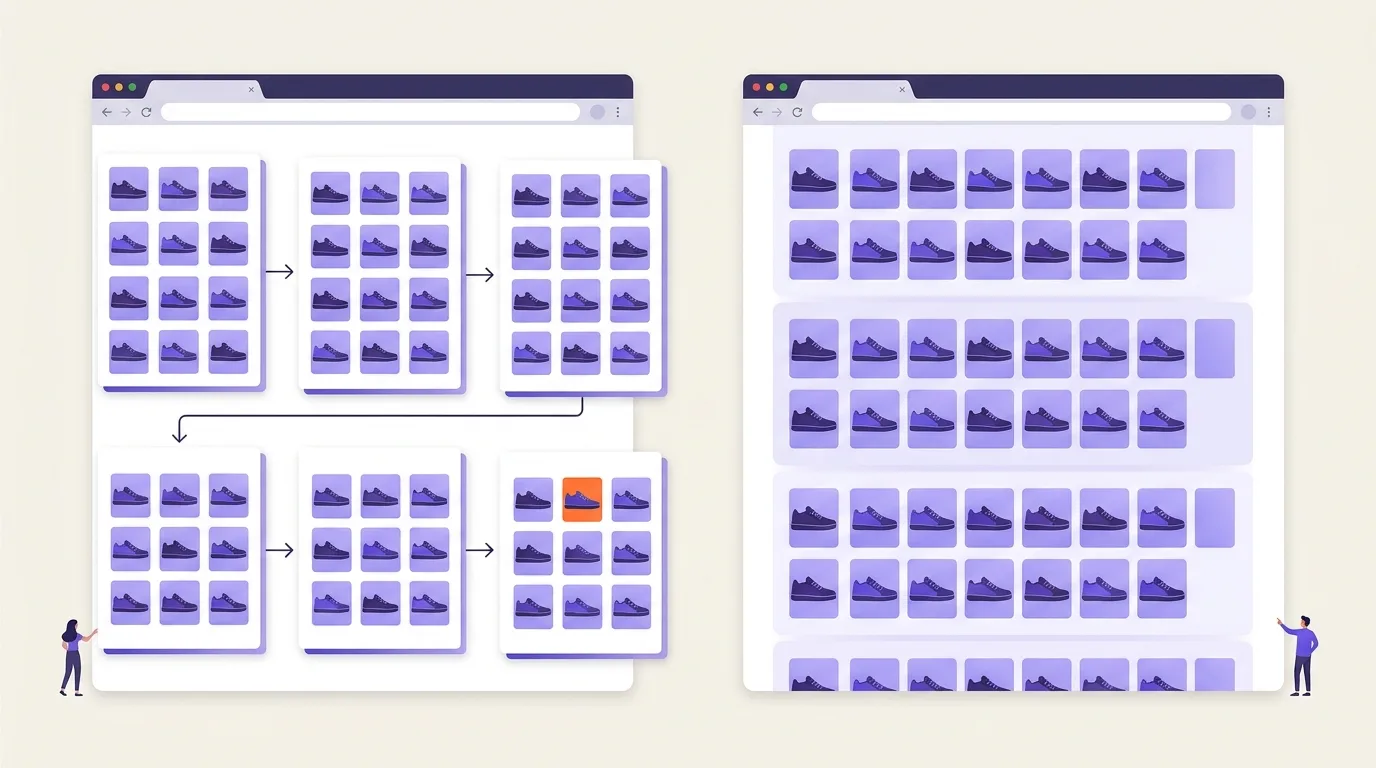
What are pagination and infinite scroll?
Pagination splits a collection, such as a shoe category, into separate pages reached through Next and Previous links. Infinite scroll appends more product cards as visitors scroll down. Load more appends another batch when visitors press a button. These interfaces can share the same underlying pages and links.
The distinction is between what visitors see and how the collection is organized. A category may feel like one continuous feed while still providing a separate, directly accessible URL for each batch of product cards.
How the interfaces differ
Each interface controls how visitors reach the next batch in the same shoe category.
- Pagination: Next opens a separate page of shoe cards; Previous returns to the preceding page.
- Infinite scroll: More shoe cards appear below the existing cards as the visitor scrolls.
- Load more: A button adds the next batch below the cards already shown.
A shared paginated foundation
Progressive enhancement adds scrolling or button-based loading to an accessible paginated foundation. Each batch remains available at its own URL, connected through links. This is a shared collection for visitors and crawlers, not separate content served only to search engines.
This section covers collection pages, including product categories and article archives, rather than general JavaScript implementation. Broader navigation design concerns how pages fit together; see site architecture and navigation.
When should you use pagination, infinite scroll, or load more?
Pagination supports deliberate navigation to specific content. Infinite scroll suits browsing for discovery, while load more lets visitors request another batch. Choose based on the task and your ability to maintain the experience, not the website type. Later items must remain discoverable, and visitors need stopping points and ways to return.
No interface automatically improves rankings or ensures indexing. Treat access to later content as a requirement, not a benefit of the interface you choose.
| Need | Pagination | Infinite scroll | Load more |
|---|---|---|---|
| Precise navigation | Clear page destinations | Needs location controls | Sequential continuation |
| Exploratory browsing | Pauses between pages | Continuous discovery | Visitor-controlled batches |
| Shareable locations | Separate page URLs | Needs batch URLs and browser URL updates | Needs batch URLs |
| Footer access | Clear endpoint | Keep footer reachable | Reachable before loading more |
| Implementation effort | Linked-page foundation | Added loading and location logic | Added button and loading logic |
Choose by task and implementation capacity
A suitable interface helps visitors finish their task without losing their place.
- Choose pagination when people need to compare, revisit, or navigate deliberately.
- Consider infinite scroll when discovery matters and your team can support reliable location recovery.
- Choose load more when visitors should decide when browsing continues.
Check keyboard navigation, focus continuity, and access to controls as part of web accessibility.
Performance depends on what each implementation loads and retains; assess trade-offs through page speed optimization rather than assuming one interface is always faster.
Build a crawlable pagination sequence
A crawlable pagination sequence gives each content batch a direct URL and links it to the next batch; this section covers that setup.
- Use dedicated URLs. Let /shoes/ open the initial batch and /shoes/?page=2 open the next batch. Each URL must show its corresponding content without a prior visit, stored session, or button click. Use these resolvable URLs for sharing, not fragment-only states such as /shoes/#page=2: Google ignores fragment identifiers for pagination (Google Search Central).
- Connect the sequence with links. Link each page to the following page using HTML anchor elements with href attributes, and consider links back to the beginning (Google Search Central). On /shoes/, use this link: Next. Previous and numbered links can also help visitors navigate.
- Use self-referencing canonical URLs. Give each distinct paginated page its own canonical rather than pointing the whole sequence to /shoes/, as Google recommends (Google Search Central); see canonical tags for implementation mechanics.
Server-rendered links and content are a robust implementation option. JavaScript-generated anchors can also be crawlable when their href values resolve to real URLs (Google Search Central); see JavaScript SEO and rendering for rendering mechanics.
Add infinite scroll without hiding later content
This section covers progressive enhancement: keeping content accessible through linked chunk pages while adding automatic loading for visitors.
- Retain fallback pagination. Keep directly accessible pages and sequential links beneath the infinite-scroll experience. Google recommends linking each page to the next with HTML anchor elements and href attributes, so automatic loading should supplement that route, not replace it (Google Search Central).
- Do not depend on interaction. Google Search does not scroll or click to reveal content, so neither a scroll handler nor a Load more button provides a sufficient discovery path (Google Search Central).
- Preserve chunk identity. Persistent chunk URLs should consistently retrieve the intended content, as Google recommends; avoid session-only cursors and moving labels such as “yesterday” (Google Search Central). A direct visit must expose that chunk without loading every earlier batch. Use the same content-access model for visitors and crawlers.
- Update and test browser URLs. Google recommends using the History API when a chunk becomes the primary visible content (Google Search Central). Changing the address bar does not create a working destination: the application must handle direct requests to that URL. Test refresh, shared links and browser Back behavior.
For rendering and lazy-loading implementation details, see JavaScript SEO and rendering.
Common pagination and infinite-scroll SEO mistakes
Pagination and infinite-scroll SEO mistakes include outdated tag advice, hidden content, and rules that treat later pages as less useful without checking them.
- Relying on obsolete pagination signals. Google no longer uses rel=”next” and rel=”prev” to identify paginated sequences; ordinary crawlable links remain necessary, as explained in Google’s pagination guidance. Do not treat these tags as a replacement for navigation links.
- Using schema as a workaround. BreadcrumbList or other markup cannot replace accessible content and links; see structured data for implementation guidance.
- Requiring unique metadata. Pages in a sequence may share titles and meta descriptions; Google does not require unique versions for each page, according to Google’s pagination guidance. Page labels may help users distinguish locations, but rewriting every description is not mandatory.
- Applying blanket noindex rules. Do not add noindex solely because a URL is a later pagination page; base that decision on your indexing policy.
- Checking only the opening page. A working initial view can hide broken later chunks, repeated batches, missing items, or button-only navigation. Check later locations directly and compare their contents with the intended collection.
- Adding every pagination URL to a sitemap by default. Choose URLs according to your XML sitemap selection policy, rather than assuming every batch belongs.
How do you check that every content batch is accessible?
Check batches near the beginning, middle, and end, including direct entry into a later chunk. Verify content, item links, onward links, and browser history. Google Search does not scroll or click to load content, so test access without those actions (Google Search Central).
- Open sampled URLs directly. Confirm each returns its expected batch with working item links. Persistent chunk URLs should consistently retrieve the same content (Google Search Central).
- Follow the sequence. Check onward links until the final batch; Google recommends linking each page to the next (Google Search Central).
- Compare initial and rendered HTML. Look for HTML anchor elements with href attributes pointing to resolvable pagination URLs, including JavaScript-generated links (Google Search Central). Disabling JavaScript tests progressive enhancement, not Google’s rendering behavior.
- Test browser state. Google recommends History API URL updates when a chunk becomes the main visible content (Google Search Central). Scroll, copy and reopen the URL, refresh, and use Back; check that each restores the intended location.
- Inspect sampled chunks. Use URL Inspection to examine rendered content and indexing information; see Google Search Console for tool operation.
- Crawl from the collection entry page. Compare discovered chunks with the expected sequence to find unreachable batches and missing item links; see crawlability diagnostics for broader checks.
Success means accessible batches and discoverable item URLs, not indexing or traffic for every pagination page. Lighthouse alone cannot establish crawlability or indexing.
Frequently asked questions
How many products or articles should each pagination page contain?
Page size is the number of items shown before a visitor moves to another page. Choose it based on usability and loading performance, rather than a fixed SEO quota. Test representative pages on mobile devices. Show enough items to help people browse, but reduce the count if images or scripts make the page slow or awkward to use.
Do individual products still need their own URLs when a category uses infinite scroll?
A product URL is a direct address for an individual product. Yes—keep a separate URL for each product you want indexed as its own page, and link to it from the category. Infinite scroll changes browsing, not that need. The scrolling category also needs persistent, unique, sequentially linked chunk URLs so its content is accessible, as Google Search Central recommends.
Is a view-all page necessary for pagination SEO?
A view-all page displays the full collection in one place. It is not necessary for pagination SEO. Google recommends unique URLs and a separate self-referencing canonical for each paginated page, rather than canonicalizing the sequence to its opening page, according to Google Search Central. Offer a view-all option only if it helps visitors and remains practical to load and browse.