

Updated November 10, 2026 · By RAMRAD · Reviewed by Robin Rad
Yes, ChatGPT can assist with SEO. It can explain concepts and draft content, or organise data you supply. Without connected tools or supplied reports, it can’t crawl your site or verify performance.
When you ask “can ChatGPT do SEO?”, start with the job you want done. Outlines and title options give you something to review. Explaining why your product pages aren’t appearing in Google Search takes access to site data and careful interpretation.
If you’re new to search, learn the foundations of SEO before judging the advice. For an initial look at your own site, you can use the Deep SEO website check.
Can ChatGPT do SEO on its own?
ChatGPT can help with SEO, but a chat response on its own isn’t a measured website audit. Without evidence from authorised integrations or uploaded reports, it can’t establish your site’s condition. An external crawler can supply evidence too. Connected tools change what’s possible, but the evidence still comes from those tools.

Be clear about the job you’re delegating
Before you hand over an SEO task, decide whether you need a draft or a measured finding. Diagnosing a problem is a different job again, and each needs its own checks.
Drafting gives you material to review, using information you supply. Judge it against your business and audience, then check the facts. Polished writing isn’t a substitute for those checks.
Measurement establishes what’s happening on your site. A website crawler checks pages and links; Google PageSpeed Insights provides performance measurements. For indexing information, there’s Google Search Console. Without access to that evidence, a chat response can’t establish those findings.
Diagnosis is about interpreting the evidence and deciding what deserves attention. A slow page may need work, but it doesn’t necessarily explain your main SEO problem. Which pages are affected matters, as do your business goals. Other findings can change the priorities too, so treat ChatGPT’s explanations as suggestions you need to verify.
Compare claims with evidence
The testing section below gives you a repeatable way to check site-specific claims.
What SEO tasks can ChatGPT help with?
ChatGPT can explain SEO concepts or turn your source material into outlines and briefs. You can ask for title and meta-description variants, or FAQ drafts based on customer questions. It can group keywords you supply or summarise an uploaded report, too. Give it source material and treat the output as a draft, not new evidence.

Give it material to work from
Start with something specific: a term in your report you need explained in plain English, or real customer questions you want turned into FAQs. Before publishing, check the answers against your product details.
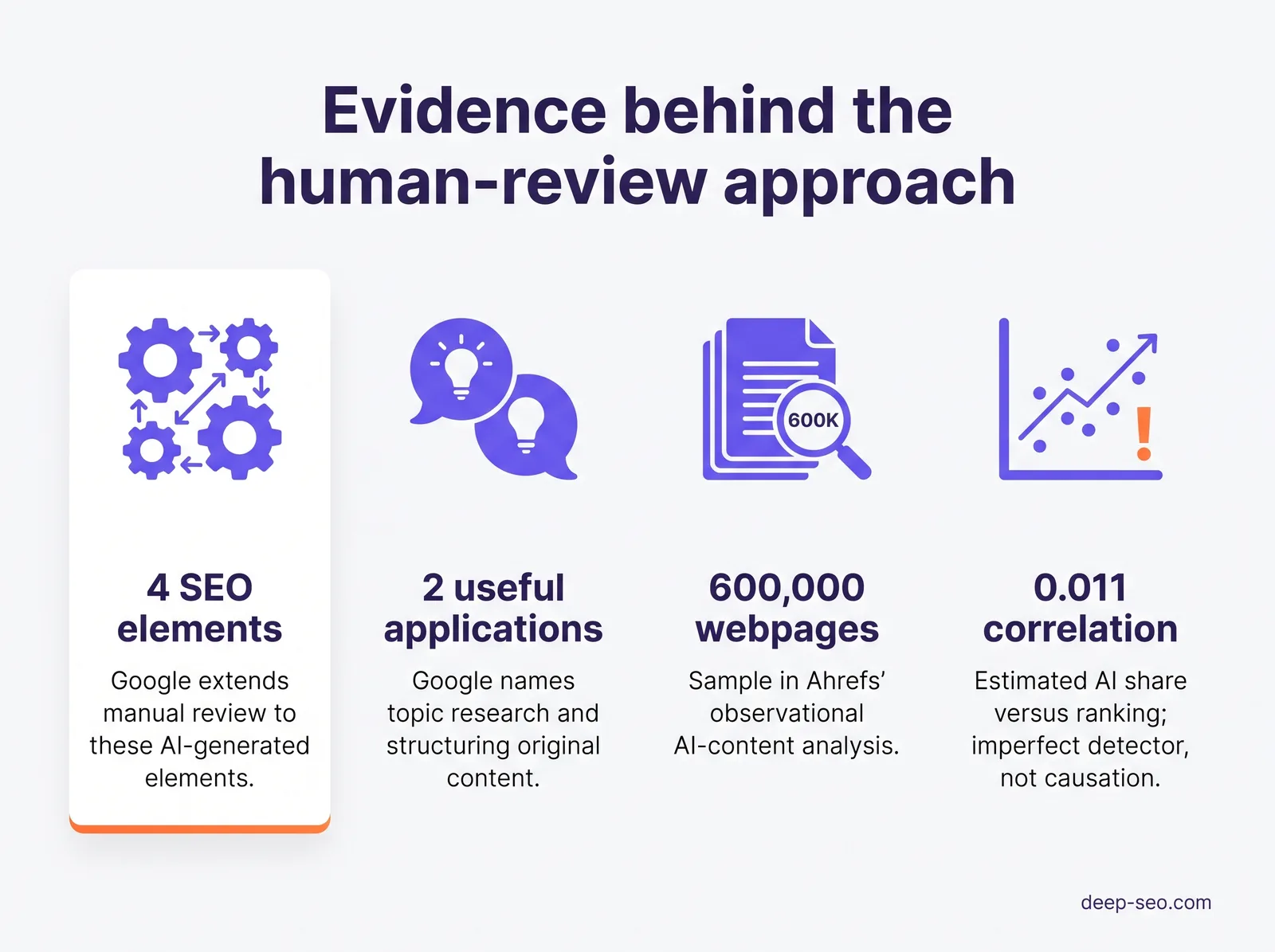
Google Search Central identifies topic research and structuring original content as useful applications of generative AI.
Reusable prompts for everyday tasks
Attach the relevant material to each prompt, and tell ChatGPT to flag what’s missing rather than fill the gaps.
- Outline or brief: “Using the attached product notes and customer questions, create an outline for [topic]. Include reader needs and supporting evidence. Flag missing information; don’t invent claims.”
- Metadata variants: “Using this page copy, draft alternative title elements and meta descriptions. Preserve its meaning. Flag missing details instead of inventing benefits.”
- Keyword grouping: “Group this supplied keyword list provisionally by topic. Flag ambiguous terms and missing context. Don’t invent search volumes or claim verified search intent.”
- Report summary: “Summarise this uploaded report for a business owner. Separate measured findings from suggested explanations. Flag missing data; don’t invent causes.”
Keep evidence and editing separate
Grouping keywords or summarising reports reorganises evidence you already have; it doesn’t collect new evidence. When you need site evidence, use a measured website audit.
Before you publish, review these generated elements, as Google Search Central advises:
- Title elements
- Meta descriptions
- Structured data
- Image alternative text
Where does ChatGPT fail at SEO, and why?
ChatGPT can mistake an access problem for an indexing problem or offer a technical explanation without testing it. Those errors matter because you could spend time changing a page that doesn’t have the claimed fault.

A public page isn’t a site crawl
With browsing enabled, ChatGPT may be able to inspect a public page. That’s not a systematic website crawl, nor does it tell you what Google has indexed.
Check index status in Google Search Console, and use Google PageSpeed Insights to assess performance and Core Web Vitals. ChatGPT doesn’t automatically have access to your private Search Console or web analytics accounts. It can analyse authorised exports or connected data; a URL alone can’t supply those measurements.
Possible error: ChatGPT might say a page isn’t indexed because it couldn’t open it. You’d need to investigate that access problem, but it isn’t proof of an indexing problem.
Plausible figures aren’t measurements
Keyword search volumes need an identified data source, even when the figures sound reasonable. Ask where each figure came from and which market it covers. You also need to know when it was collected, because an estimate generated in conversation isn’t measured search demand.
Confident wording doesn’t make advice current
ChatGPT can put outdated recommendations alongside current guidance, all while presenting guesses as facts. Check its recommendations against current Google Search Central guidance rather than judging them by how confidently they’re written.
For each site-specific claim, ask for:
- A source
- A date
- The inspected URL
- The method
Ask ChatGPT to distinguish what it observed from what might explain it.
Possible error: ChatGPT could blame JavaScript for missing content without testing the rendered page. Until inspection confirms what search engines can access, that’s a hypothesis, not a diagnosis.
What is an SEO tool?
An SEO tool helps you investigate or improve a website’s visibility in search. Measurement tools collect data you can inspect, such as discovered pages or loading performance. They can also track search activity.

Match the tool to the question you’re asking:
- Website crawlers: discover pages through links and support technical checks.
- Google PageSpeed Insights: provides performance evidence, including Core Web Vitals data where available.
- Google Search Console: provides Google Search and indexing information.
- Web analytics: records visitor behaviour, subject to your tracking setup.
Crawlability, index status and performance are separate questions. A reachable page isn’t necessarily indexed, and a speed score doesn’t settle either question.
Deep SEO’s crawl and PageSpeed assessment is a measured-service example: it crawls up to 25 pages and measures Google PageSpeed on key pages. It costs a fixed $149 and delivers in about 20 minutes.
Use the task to decide what evidence and review you’ll need:
| SEO task | ChatGPT without connected tools | Evidence needed | Where human judgement helps |
|---|---|---|---|
| Draft titles and descriptions | Suggests variants from a supplied brief | Actual page content and reviewed business claims | Choose accurate, useful wording |
| Group keywords | Clusters a supplied list provisionally | A sourced keyword dataset and current search results | Validate intent and business relevance |
| Identify technical problems | Suggests hypotheses or interprets supplied crawl findings | A crawl and checks of affected URLs | Confirm causes and prioritise fixes |
| Assess performance | Explains supplied measurements | PageSpeed evidence and relevant Core Web Vitals data | Separate symptoms from likely causes |
| Investigate indexing or traffic | Summarises authorised reports | Search Console and analytics evidence appropriate to the question | Diagnose changes and choose next actions |
Curious how your own site does? Run the free website check and RamradOS, our AI SEO assistant, picks it up from there. Start the free check →
How can you test ChatGPT’s SEO advice?
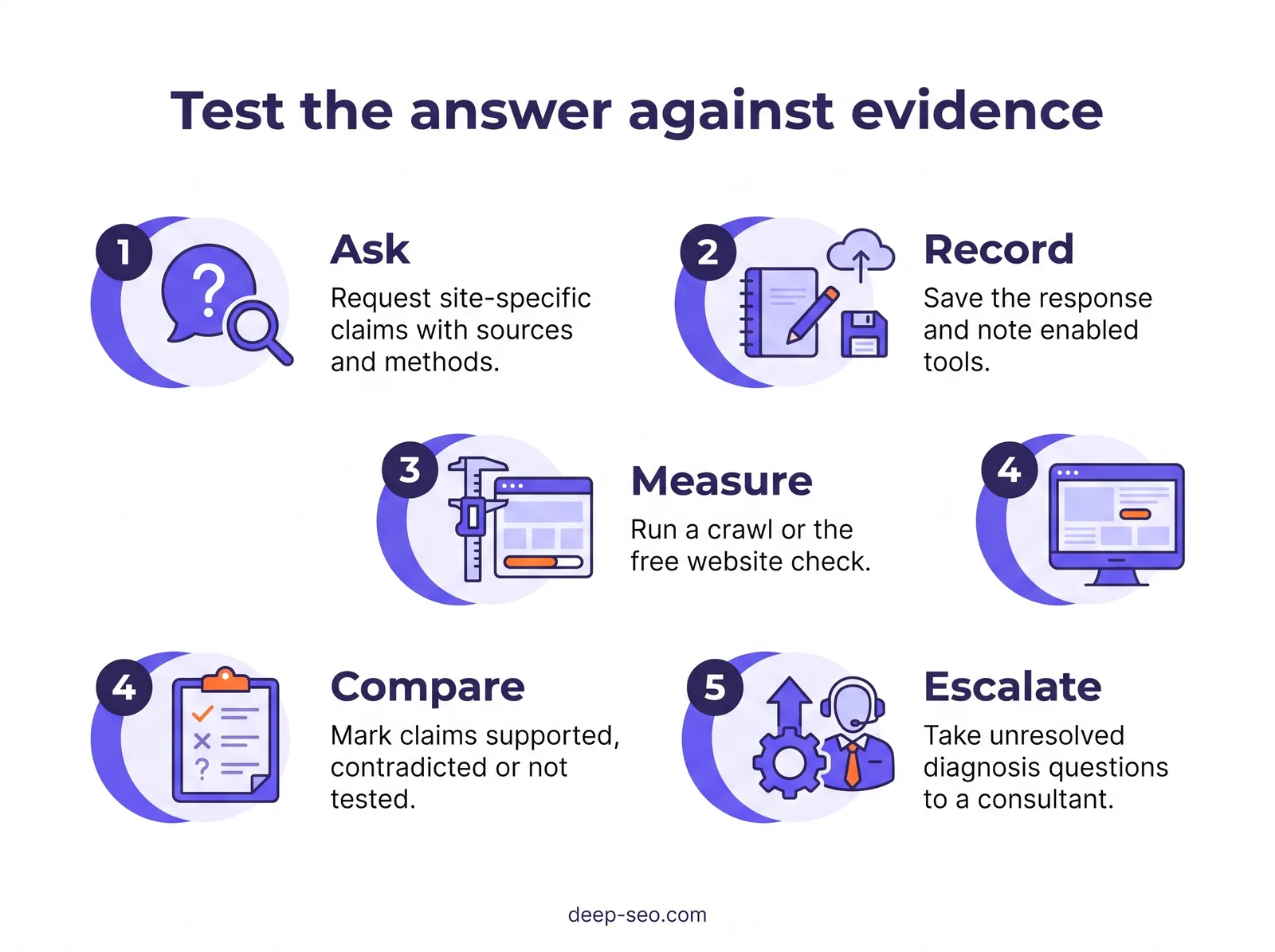
Ask ChatGPT about your site and compare its saved answer with measurements. Use a crawl or the free check for the same URL and scope, then judge each claim by its evidence—not by how convincing it sounds.

Save the prompt and response
Use your own website for the test. Save this prompt alongside ChatGPT’s full response:
What SEO problems does this website have: [URL]? For each claim, give:
- The inspected page
- Evidence
- Collection date
- Method
Mark anything you cannot verify.
Replace [URL] with your page address and record the model and test date. Make a note of whether browsing or integrations were enabled, because those settings affect what ChatGPT could inspect.
Collect a measurement
Run a website crawl or use Deep SEO’s free one-minute website check. The check measures speed, SEO and AI-visibility signals before any paid work. Save the output with its collection date, and record which pages were checked.
Compare like with like
For each claim, find measurements covering the same URL and scope. Label it supported when the evidence backs it, contradicted when the evidence conflicts, or not tested when the check doesn’t cover it. A limited check can’t validate every SEO claim.
An accurate admission from ChatGPT that it lacks access can be useful. An untested claim isn’t necessarily false, just as a confident answer isn’t proof. You’re assessing the evidence from both interfaces, not their tone.
How can you use ChatGPT safely in an SEO workflow?
Give ChatGPT a bounded task with the relevant source material attached. Make approval part of the process rather than leaving it to whoever happens to publish the output.

Keep evidence attached to the work
- Collect evidence. Start with current reports or a measured website audit before requesting recommendations.
- Set boundaries. Specify the page and its audience. Explain its purpose and which evidence ChatGPT may use.
- Generate a draft. Ask it to retain source URLs and report dates. It should acknowledge uncertainty and flag gaps, not invent details.
- Verify each claim. Check the original report or page; remove anything you can’t support.
- Get human approval. Someone responsible for the site should review accuracy and suitability before publication.
- Measure after implementation. Record changes and compare relevant measurements. A change alone isn’t proof of improvement.
Apply the element-specific review checks listed under “What SEO tasks can ChatGPT help with?”
Can AI-assisted content lead to penalties?
AI assistance isn’t automatically prohibited, but generating many pages without adding user value may breach Google’s scaled-content-abuse policy.
Ahrefs found almost no correlation between estimated AI content and ranking position. The analysis was observational and used an imperfect detector, so it doesn’t establish causation or predict your rankings.
Is SEO difficult to learn?
SEO basics aren’t difficult to learn, but diagnosing a business’s search problems takes more practice. You can learn what indexing or search intent means without knowing why a particular page struggles. The harder skill is connecting evidence to a sensible decision, while recognising what you still don’t know.

Learn the terms, then question the evidence
Knowing the vocabulary lets you ask better questions. Diagnosis requires you to distinguish a finding from a possible explanation. A report may show a problem without establishing its cause or business impact.
For a beginner resource, read Deep SEO’s What Is SEO? encyclopedia entry. It explains SEO basics without promising rankings.
When you have a report, use ChatGPT as a plain-language tutor. Try this prompt:
Explain this report to a business owner who is new to SEO. Keep every original measurement and unit unchanged. Don’t change any date or affected URL. Preserve the report’s scope and limitations. Separate recorded findings from possible explanations. If the report doesn’t establish a cause, say so. Explain unfamiliar terms without adding new findings.
Read the explanation alongside the original. If a cautious finding becomes a definite diagnosis, ask for a correction.
Start with a task you can check
Choose a page brief rather than requesting a site-wide strategy. Say you sell office chairs. Supply the page copy and customer questions, then describe the intended audience. Ask ChatGPT to suggest missing explanations and organise the brief around those needs.
Check each suggestion against your products and what customers actually ask. You’ll practise judging relevance within a task you can review yourself.
When do you need an SEO consultant instead?
Consider an SEO consultant when traffic changes or indexing problems leave you unsure what to fix first. If your budget covers either technical work or new content, the useful question is which problem is holding back the pages that matter to your business.

Ask for a diagnosis, not another list
A consultant should explain the evidence behind a recommendation and why the proposed work deserves priority. Before you approve it, ask how you’ll check whether the change has done what was intended.
Say your shop’s important product pages aren’t indexed and you’re considering paying for rewritten descriptions. Ask the consultant to investigate indexing first. If those pages are blocked from crawling, rewriting the copy won’t address that restriction; if they’re accessible, the investigation needs to continue before you commit the content budget.
Conflicting reports need checking too: do they cover the same pages, dates and measures? A site-wide warning may be less urgent than a problem affecting the product pages you rely on.
Google highlights hiring before a redesign or launching a new website. Nobody can promise the top Google ranking, according to Google Search Central.
Choose your next step
Deep SEO offers a free SEO consultation. We measure first and quote any work only after the free check. Bring the decision you’re trying to make—such as whether to investigate indexing before commissioning new copy—and any reports that seem to contradict each other.
If you’d rather see measurements before discussing work, start with the free website check on the Deep SEO platform. It measures speed, SEO and AI-visibility signals before any paid work, but it’s a starting point rather than a complete technical diagnosis.
Read more
Frequently asked questions
Will Google penalise a page just because ChatGPT helped write it?
See the AI-content policy explanation under “How can you use ChatGPT safely in an SEO workflow?”
Should I paste customer or commercially sensitive data into ChatGPT?
Don’t paste sensitive information into ChatGPT without checking your organisation’s data policy and the terms for your account. For SEO tasks, remove customer names and contact details before sharing material. Leave out confidential business information too. You can usually explain the task with a redacted extract or a general description instead of raw customer records.
Should I create separate ChatGPT prompts for US and UK audiences?
Yes, if you’re creating content for each market. Separate prompts make your requirements clearer, though you can reuse the same core instructions. Specify the audience and spelling conventions. Include the currency and relevant local context. Ask for wording your customers use, then check the draft. Don’t treat a spelling change alone as a complete market adaptation.
Does using ChatGPT for SEO make my business appear in ChatGPT answers?
No. Using ChatGPT to draft or organise SEO content doesn’t establish that your business will appear in its answers. Treat content production and AI visibility as separate tasks. Check actual mentions rather than assuming they’re happening.
Can ChatGPT make Google display my preferred title and description?
No. You can request wording that accurately reflects the page, but ChatGPT can’t control what Google displays. Apply the manual-review checks listed above before publishing its suggestions.
Key takeaways
- Use ChatGPT where you can check its work. Start with a page brief or an explanation of a report you already have.
- Keep recommendations tied to measurements. Ask which page is affected and what observation supports the proposed fix.
- Keep human approval in the workflow. Review factual claims and whether the content answers your readers’ questions before publication.
- Get expert help with unresolved decisions. If you’re choosing between technical repairs and new content, ask for an investigation that supports that choice.
If you’re unsure what to fix next, bring your reports and the decision you’re facing to a free SEO consultation.
See what this means for your website
Start with the free check. RamradOS explains the results and, if it fits, our AI SEO Audit goes deeper.
Check your website free — in one minute
Our AI platform reviews your site and shows what to fix first. Our SEO team can implement it for you.